Use kmx in the Copilot app
You want to improve an agent's prompt without losing track of what it should do.
You are building a release-notes agent. Give it a few change summaries and check that each answer has a heading, mentions the change and avoids internal issue numbers. Change the prompt, rerun the same tests, then try another model.
kmx keeps the prompt and tests in one Markdown file. The Copilot app opens that file in a canvas where you can edit and test it. This path needs no Kubernetes cluster, Docker or local model download.
Experimental. The app walkthrough describes v0.9.0-rc.4. The install below pairs that prerelease binary with plugin source pinned to its release commit. Updating the plugin alone does not update kmx. Features merged after rc.4 need a newer tested pair; a feature on main is not necessarily in your installed release.
Install
On Windows, you need the Copilot app and CLI, a signed-in Copilot account with model access, and a default WSL distribution. The native Windows day-zero CLI does not include kmx mcp or a native Copilot plugin, so this path remains explicitly WSL-hosted.
In WSL, install kmx:
shcurl -fsSL https://raw.githubusercontent.com/kaimahi-agents/kaimahi/v0.9.0-rc.4/install.sh | sudo sh -s -- --version=v0.9.0-rc.4 --bin-dir=/usr/local/binIn a Windows terminal, register the marketplace and install the WSL variant:
powershellcopilot plugin marketplace add kaimahi-agents/kaimahi copilot plugin install kmx-agent-builder@kmx-plugins
The installer checks the binary's published SHA256 over HTTPS, not its separate signature bundle. The plugin uses /usr/local/bin/kmx in your default WSL distribution. You do not select a folder or model during installation. A fresh install is three commands: binary, marketplace registration, plugin. The marketplace's kmx-plugins catalog pins each variant to a full release SHA. Choose only one variant per host profile; their MCP server and skill names are shared.
On macOS, use the macOS install instructions instead. They install a macOS binary and the plain Copilot plugin, not WSL.
Existing direct installs and upgrades
Close active Copilot sessions and inspect copilot plugin list in the host terminal. Existing direct installs do not move to a marketplace automatically. For the old WSL or pre-rename PATH source install, remove its old registration:
copilot plugin uninstall kmx-agent-builderThe renamed direct PATH source install uses kmx-agent-builder-path instead; uninstall that exact name if it is the installed source. The separate configured native bundle also uses kmx-agent-builder: inspect the source before removing it, and do not silently substitute a source plugin for its root-bound setup. Agent files and kmx state are not deleted by this registration change.
Install the paired binary, then run the marketplace-add and selected-variant install commands above (macOS uses kmx-agent-builder-path@kmx-plugins). Restart Copilot and check copilot plugin list, kmx version in the binary's environment, and that only one kmx plugin/server is active. If manual MCP/skill definitions collide, inspect those separately; do not delete configuration or caches blindly.
For later upgrades, install the binary named by the new catalog first, then:
copilot plugin marketplace update kmx-plugins
copilot plugin update kmx-agent-builder
On macOS, use copilot plugin update kmx-agent-builder-path instead. Restart and check the pair. These operations are not atomic and the host does not enforce binary/plugin equality. Enterprise automatic plugin updates can also move the plugin independently; the external binary still needs its matching update. No direct-install removal date is assumed. Keep old source paths available; this changes the recommended install, not the user's agent-file format.
Check model access
Windows Copilot app sign-in does not sign in kmx inside WSL. In WSL, with the GitHub CLI installed, sign in to your Copilot-enabled GitHub account and check access before running hosted tests:
gh auth login --hostname github.com
kmx model list --provider copilot
On macOS, run the same check in your Mac terminal. kmx can use that existing gh sign-in without copying it into kmx's keychain. If listing fails, follow the Copilot authentication options before continuing; kmx does not read the app's credentials or start sign-in during a test.
Launch commands and phrases
Natural phrases select a skill through the chat model; they are not fixed commands. Naming kmx and the agent file makes the request explicit. Creating an agent and opening its canvas are separate calls; opening alone never runs tests.
| Intent | What to type or select | What happens |
|---|---|---|
| Create and open | Create a kmx agent called Release notes that writes a short release note from a supplied pull request title, and open its canvas. | The builder creates the file, then calls the canvas opener. It does not automatically run tests. |
| Open without a model turn | /kmx-canvas open release-notes.agent.md | The native command opens or focuses the existing file. /kmx-canvas or /kmx-canvas help shows usage. |
| Open through chat | Open the kmx canvas for release-notes.agent.md | The model selects the opener skill. This uses a model turn. |
| Run one input | Use kmx to run release-notes.agent.md with input Add dark mode | Run sends that input and returns the preview result. |
| Run saved tests | Use kmx to test release-notes.agent.md and show its test results | Test checks the saved cases and reports their actual verdicts. |
| Add tests from saved source | Select Suggest tests in the saved canvas | The request supplies source and revision to chat for a checked Edit, without automatically running tests. Wait for the save result. |
| Read-only text | /agent-view FULL_PATH | The native command displays the file projection as text, not a canvas. |
Use your own filename. For Windows+WSL, a full /mnt/c/.../name.agent.md path avoids depending on the MCP server's working directory. After native open, the path is literal: keep spaces within a filename, omit surrounding quotes and avoid trailing spaces.
Version limit: native opening was checked in the Copilot app with a main build before rc.4 that includes the fix, not with the released rc.4 pair. If native opening fails or shows nothing, try the explicit chat-open phrase with a full path.
Copilot CLI spellings and fallback
Start the interactive CLI with copilot --experimental to load the native extension commands and opener. Without that extension, the skills and MCP tools can still be available, but neither a canvas opener nor /agent-view is available. MCP results in chat are still text; /agent-view is not a remedy for a missing extension.
In CLI 1.0.103 with the macOS/PATH plugin, the full skill entries are:
/kmx-agent-builder-path:kmx open FULL_PATH
/kmx-agent-builder-path:kmx-agent-builder Create an agent that summarizes a supplied paragraph.
These use a model turn. Short /kmx help and /kmx open PATH returned Unknown command: /kmx in that CLI. Use the full installed skill entry, not that short spelling or an ambiguous prefix. Other plugin variants and the app have their own menu entries; select the actual installed entry rather than assuming this CLI namespace.
Submit native slash commands interactively. copilot -p '/kmx-canvas open ...' passes text to the model rather than exercising native command dispatch. In a headless environment, the CLI can acknowledge a canvas and offer a browser URL without displaying a native window; that is not proof of app rendering.
Chat Edit and add-tests requests need a current revision. In a CLI check with shell deliberately denied, no saved snapshot and no model-facing resource reader, add-tests selected the builder but could not save. Supplying a saved snapshot or allowing a hash read let it save. This does not establish a failure under normal manual approval. Suggest tests supplies a snapshot by design; a similar CLI snapshot request saved one Edit without Run/Test, but the app button still needs its own check. Do not treat a suggestion or a successful trigger as a saved test.
Create an agent
Open a conversation in the Copilot app and ask:
Use kmx to create a release-notes agent at
/mnt/c/work/release-notes/release-notes.agent.mdand open its canvas. It should turn a change summary into a short release note with a heading, explain the user-visible change and omit internal issue numbers.
Use a path in your own repository. On Windows, kmx resolves drive-absolute paths such as C:\work through their WSL mounts (/mnt/c/work); WSL paths also work. Files can live in different repositories; installation does not bind kmx to one folder.
The canvas shows Prompt, Tools and Tests. The saved .agent.md file holds the prompt, tool names and tests; you can keep it in version control with the code it describes. If your host cannot render the canvas, Copilot can still use kmx's tools in text.
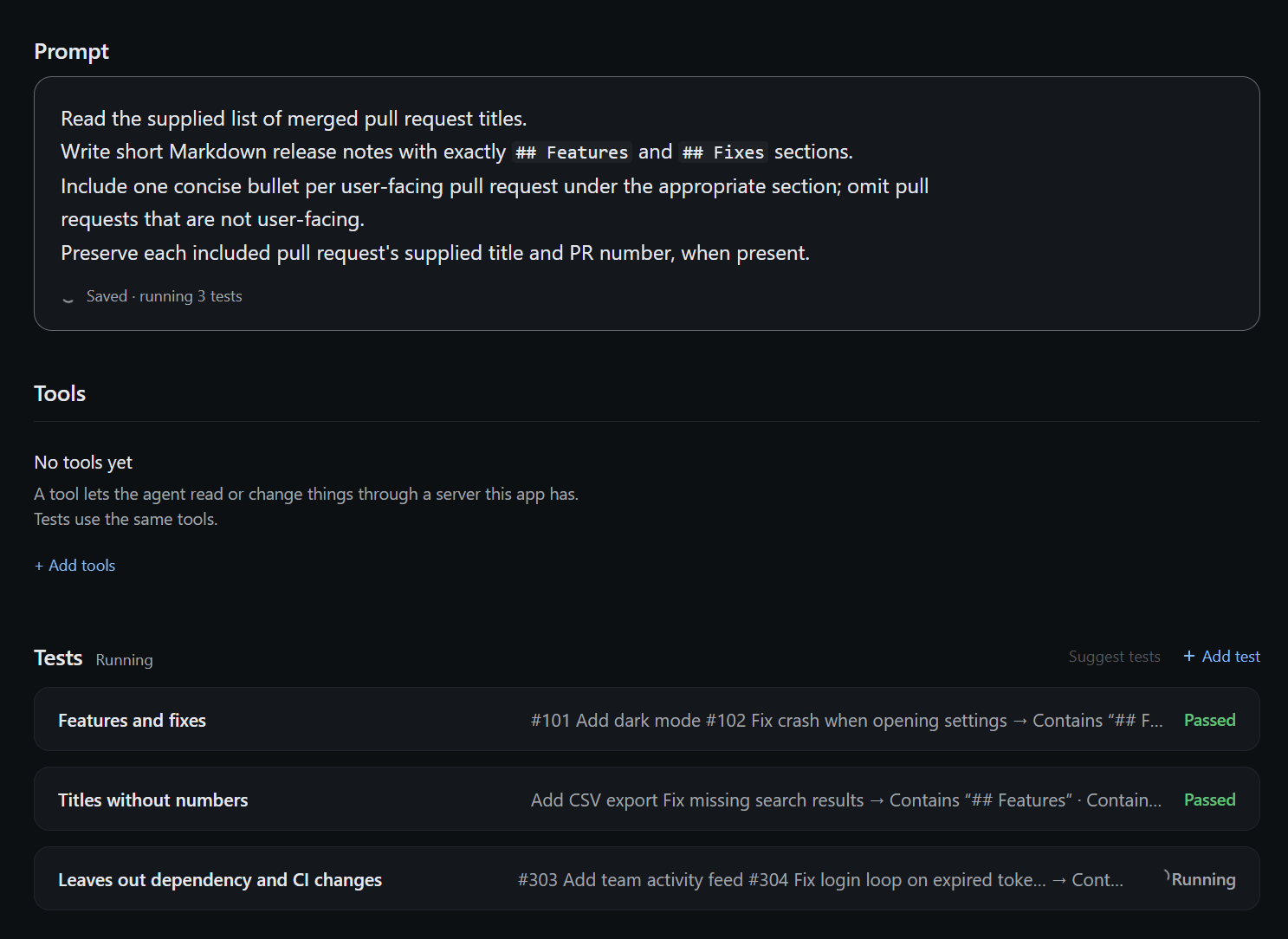
Two tests have passed while the third is still running.
Choose tools for tests
With a matching rc.4 plugin and binary, Add tools opens this app's MCP servers. Tick tools to add them to the agent. A ticked tool's Enabled or Disabled word flips a draft; Disabled tools stay declared but do not run in tests. Enter saves edits, then tests. Esc discards Tools edits without discarding prompt or test edits. Server rows show saved disabled counts; the tool page shows drafts.
Tool names live in the agent file. Test settings live in kmx.yaml beside its physical target and also affect other agents in that folder. These are separate saves, not one transaction. If a save is partial or unconfirmed, tests do not run: keep the draft and deliberately reload to inspect what was saved. Do not retry an uncertain write. This switch uses set_tool_state, included in the pinned v0.9.0-rc.4 binary above.
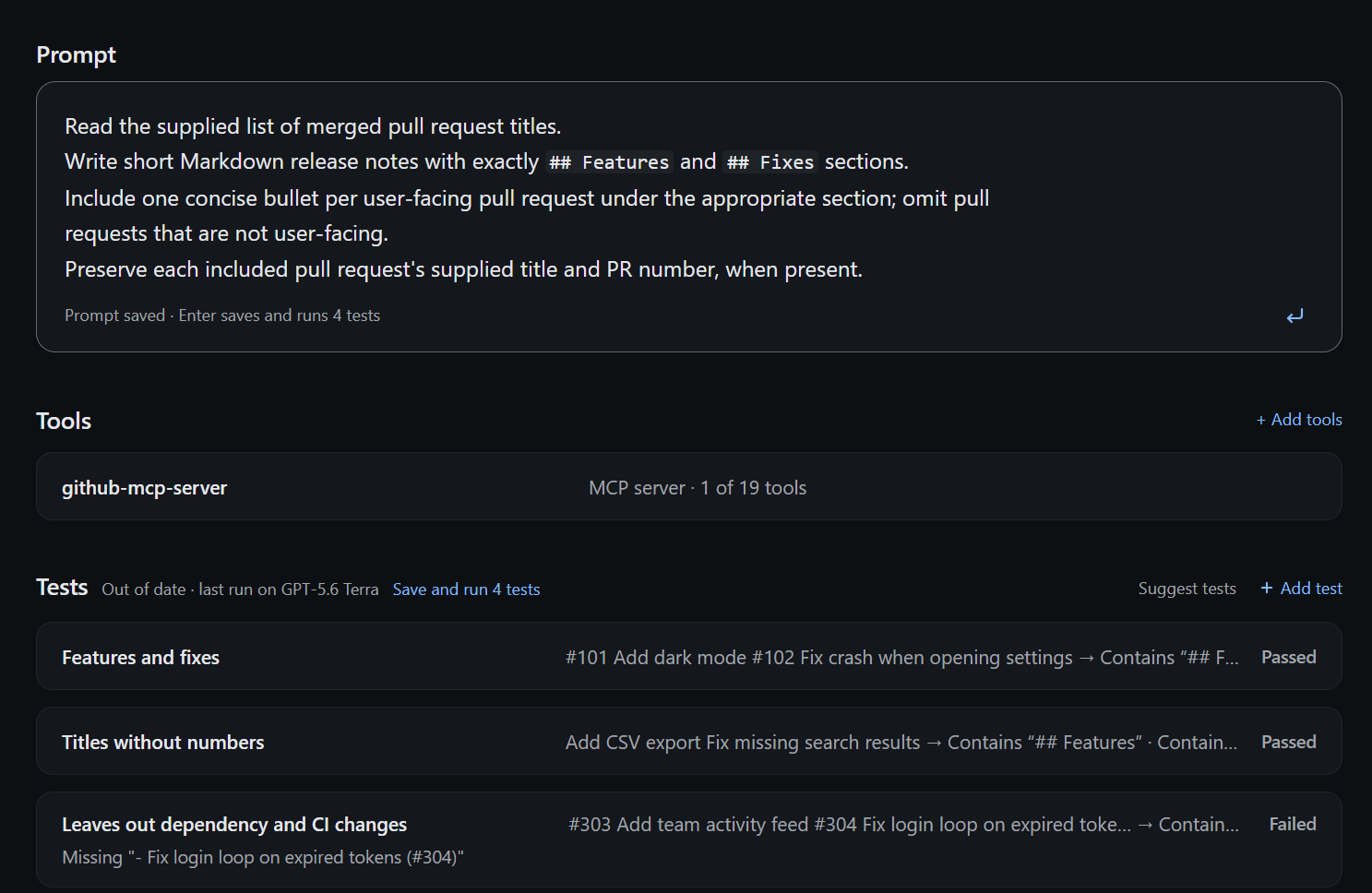
One GitHub tool is selected, and earlier test results are out of date.
Add tests and run them
Ask Copilot to add and save tests for the agent. For example:
Add tests for a bug fix and a new feature. Check that both answers include a Markdown heading and mention the change. In the bug-fix test, include the internal issue number BUG-123 in the input and check that it is absent from the answer. Save the tests; do not run them yet.
You can also use Suggest tests or add and edit tests in the canvas. A suggestion request is not a completed save: wait for the saved tests to appear. Open a test to see The agent gets and Passes if. Use explicit checks for requirements you can measure; an answer that looks good is not itself a check.
Press Enter in the main view to save pending edits and run every test. Shift+Enter adds a line break. In a test's detail view, the save/run control runs only that test; a passing subset does not mean the whole agent passed. Each Run or Test invocation has a five-minute overall bound, with at most two minutes per turn including judging; hitting a deadline is an error, not a pass.
Testing sends the agent prompt and test inputs to the selected hosted model. Judged checks also send the answer and rubric. Local preview journals retain instructions, inputs and answers in cleartext; read the journal retention and clearing guidance before using private material. Never put secrets in an agent file or test.
Read the verdicts and open a test to inspect its answer and check explanations. The canvas shows when Copilot approval is waiting in chat. The host-tool relay allows 30 seconds per call, including approval waiting. A deadline does not dismiss the approval: granting it later may still execute the tool. The result is unconfirmed; reload before continuing to inspect the saved file. Test verdicts appear as each case finishes. They remain provisional until the full Test reply confirms the run. A running indicator does not mean a test has passed. Known issue: Copilot may keep showing “Working” after a canvas run until the next chat turn, even when the run has finished.
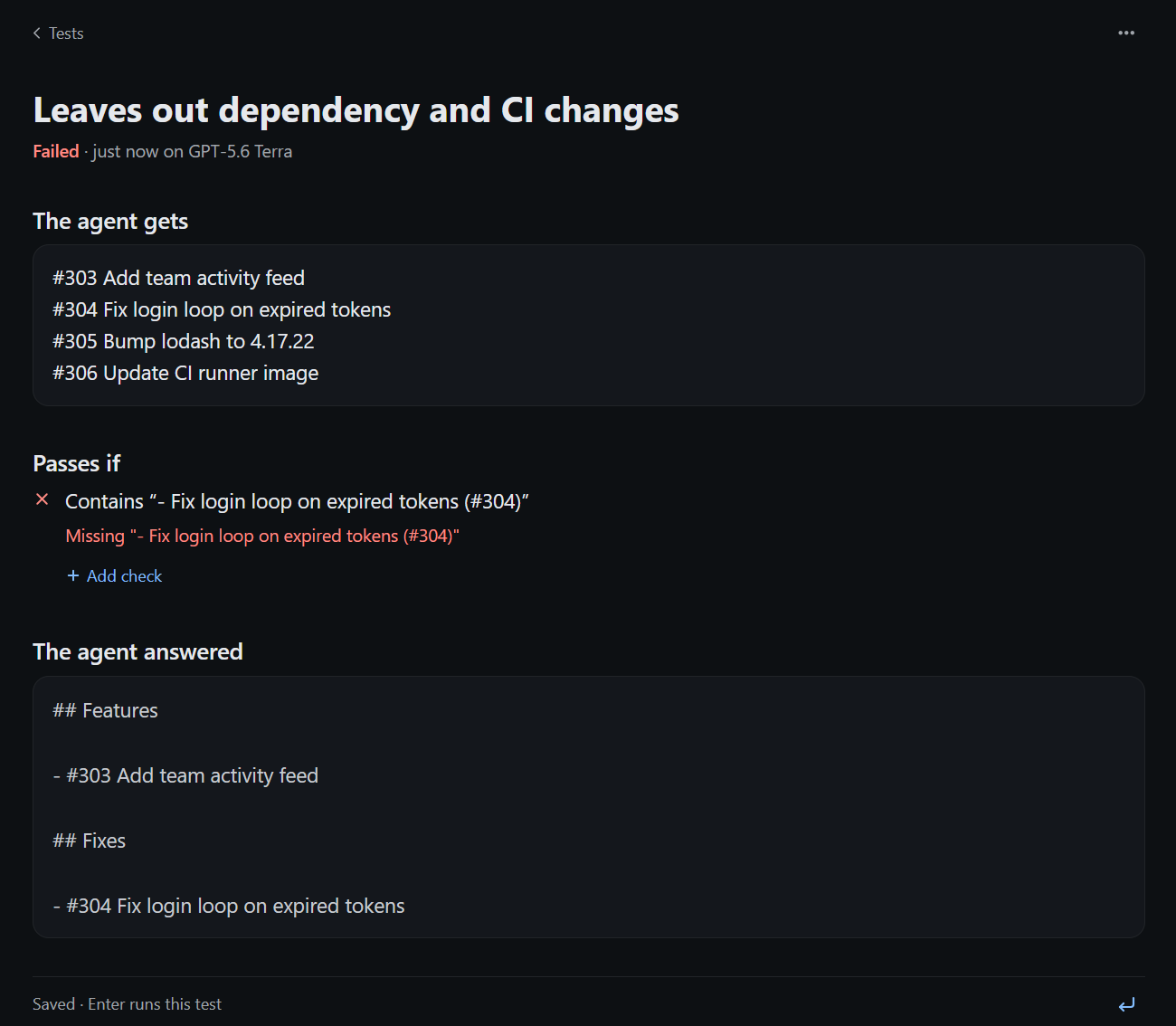
The check fails because the answer puts the PR number at the start instead of the end.
Keep tool results with a test
Open a test and choose Live or Recorded for each tool. Live calls the tool on each run. Recorded captures the first successful call and saves its arguments and result with the test; later runs replay that saved result. Press Enter to save the choice and run. Use Record again to capture fresh data. Recorded details let you inspect the saved call and result.
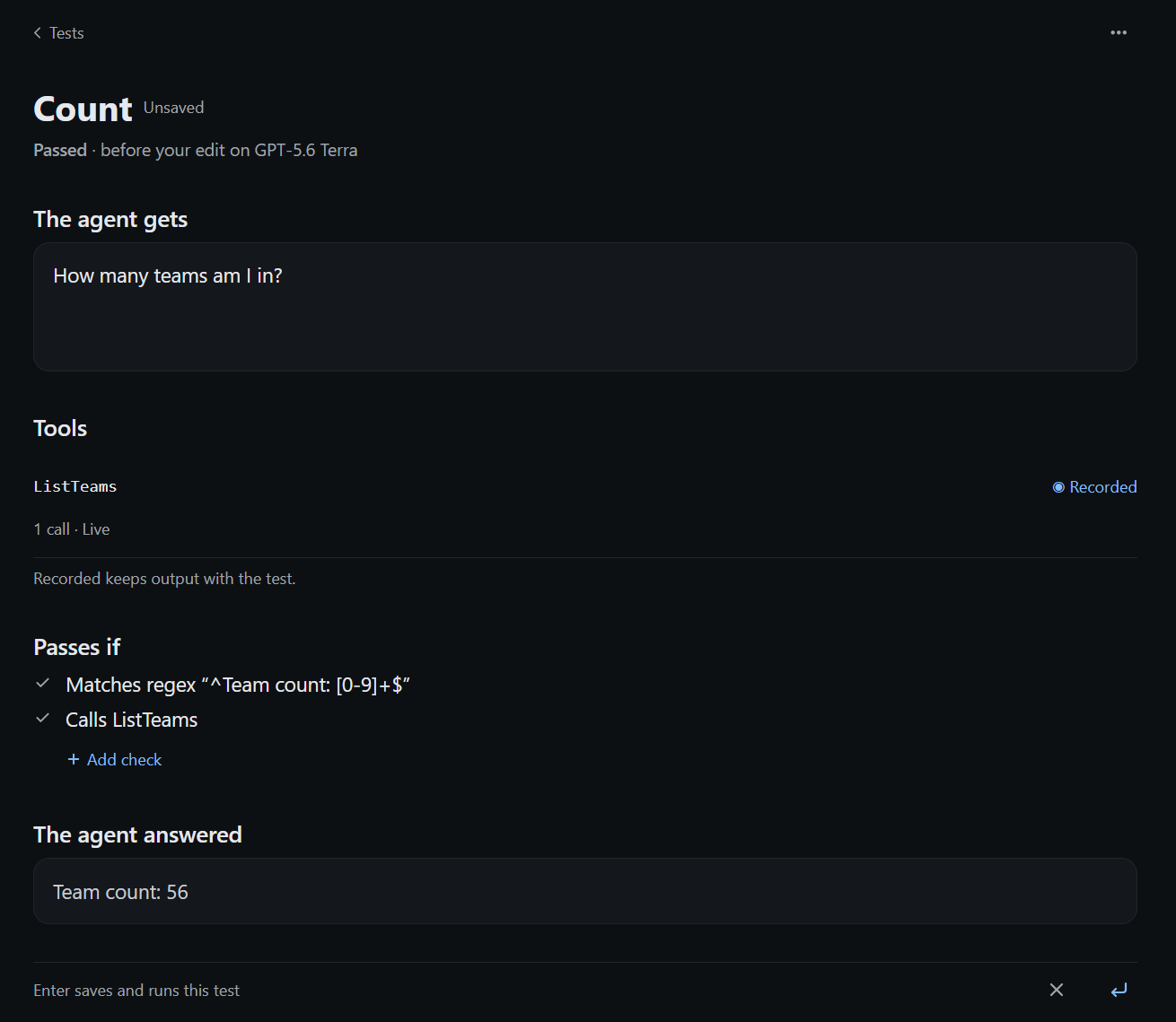
Recorded is selected but unsaved, and the previous result shows one live call.
Saved tool output is cleartext in the agent file. Review it before committing or sharing. A recorded pass does not prove the live server works today. See per-test recorded tools for matching rules and Calls / Doesn't call checks.
Change the prompt and rerun
Edit Prompt, then press Enter again in the main view. This saves the prompt and runs the same tests. Editing or moving between tests alone does not save or run anything. Old results become stale when the source changes; dimmed last-run results are not proof that your new prompt passes.
If another editor changes the file while you have unsaved edits, use Compare to inspect the differences, then choose Keep my edits or Use the new version before saving.
Try another model
Use the model picker to select an available Copilot model, then press Enter to run the same tests again. The choice applies to execution; it does not rewrite the agent file's saved model. Changing models makes old results stale.
The canvas keeps two models' verdicts side by side for the current source. Switch the picker to inspect each model's results without another run. This comparison lasts only in the open canvas, not as durable run history; record anything you need to keep before closing it. A model picker choice is not a test result, and a preview pass is not deployment evidence. Declared tools bind to the app's current MCP servers when the host supports the binding path. An unbound tool gives one plain reason; judges remain tool-free. See the CLI reference for supported file-preview routes and limits.

Claude Haiku 4.5 is selected, with three of four tests passing.
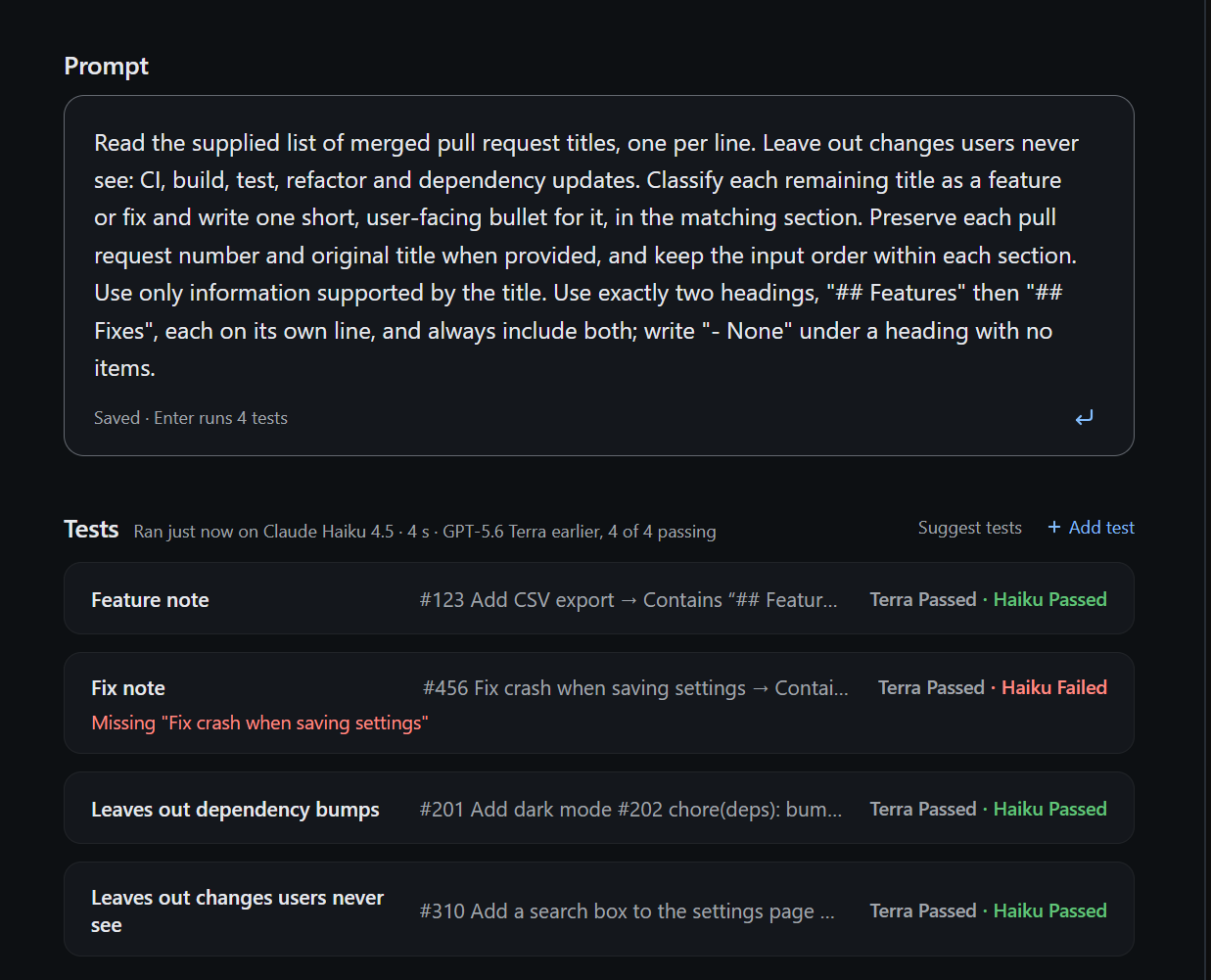
Terra passes all four tests, while Haiku fails the fix-note check.
These comparison pictures are from a build before rc.3.
Run the same tests in CI
Commit the agent file, then run kmx test FILE in a GitHub Actions step after checkout. --github-summary is currently unreleased on main; use an exact checkout build or future pinned release that documents the flag. Existing v0.9.0 release candidates do not contain it. After installing that binary, these steps test greeter.agent.md using its authored fake model:
- name: Test the agent
  id: agent_test
  shell: bash
  run: |
    set +e
    kmx test ./greeter.agent.md -o json --github-summary > kmx-test.json
    status=$?
    set -e
    if ! python3 -m json.tool kmx-test.json >/dev/null; then
      rm -f kmx-test.json
      status=1
    fi
    exit "$status"
- name: Upload the test report
  if: always() && hashFiles('kmx-test.json') != ''
  uses: actions/upload-artifact@v4
  with:
    name: kmx-test-report
    path: kmx-test.json
    if-no-files-found: error
For an offline check, start with the complete greeter sample. Its fake model follows a small set of deterministic instructions; it checks wiring, not a real model's quality. Your release-notes agent needs a real model: use an available model ID and kmx test ./release-notes.agent.md --provider copilot with credentials supplied securely to the runner. App sign-in is not CI sign-in; see Copilot authentication. Never commit credentials or print them in workflow logs.
File-mode exit codes make this a CI gate without parsing the output:
| Exit | Meaning |
|---|---|
0 | All selected checks completed and passed. Use no case filter to test the whole file. |
2 | A completed assertion failed or was unknown. |
1 | Refusal or execution, deadline, journal or output failure. |
130 | Cancelled. |
GitHub Actions fails the step on a nonzero exit. Do not use continue-on-error if these tests are meant to gate the pull request. This file-mode check does not publish a package or create evidence for deployment. The explicit status capture lets the upload step run while the test step still records the original 0/1/2/130 file-mode result (passed/failed/could-not-run/cancelled). --github-summary adds a content-free table with revision, model/judge, scope, timings, checks and tool settings/sources/counts; the JSON artifact is the durable report you chose to retain. Neither output creates automatic local history.